

RAG and AI Agents: What They Are, How They Work & When to Use Them
Artificial Intelligence isn't a single magic box—it's a collection of patterns, systems, and design choices built to solve very different problems. Over the past few years, two terms have taken center stage in every AI architecture conversation: Retrieval-Augmented Generation (RAG) and AI Agents. Both are powerful, both are genuinely useful, but they serve fundamentally different purposes and choosing the wrong one can cost you months of engineering effort.
This guide cuts through the jargon. Whether you're a developer evaluating architectures, a product manager scoping an AI feature, or a technical lead justifying a platform decision, by the end you'll know exactly when to reach for RAG, when to spin up an agent, and when to combine them into something greater than the sum of their parts.
In this article we'll cover:
- What RAG is and the role of vector databases in making it work
- What AI Agents are and how they think and act
- Practical use cases and real-world examples for each
- A side-by-side comparison to help you choose
- How RAG and Agents combine into Agentic RAG
What Is RAG?
At its core, Retrieval-Augmented Generation (RAG) enhances a language model by giving it access to external knowledge at runtime. Instead of relying only on what the model absorbed during training—which has a fixed cutoff date and is shaped by whatever data it was trained on—RAG lets the model actively search a curated knowledge base, pull in relevant content, and build its answer from that grounded information.
Think of it like the difference between a colleague who studied hard years ago and trusts their memory, versus one who has access to a real-time library and checks the source before they answer. RAG is the second colleague.
How RAG Works
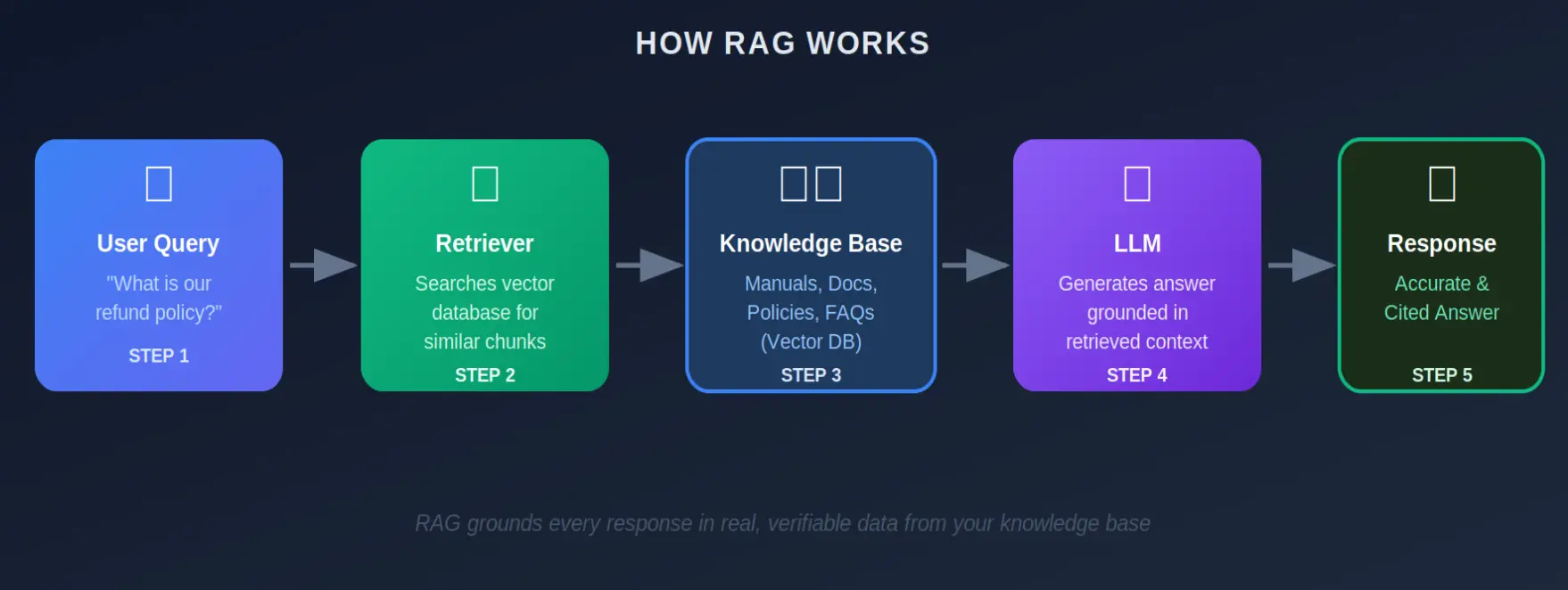
The flow is elegant in its simplicity:
- Step 1: A user sends a query — a question, a request, or a prompt.
- Step 2: The retriever searches a knowledge base for the most semantically relevant content chunks.
- Step 3: Those chunks are injected into the LLM's context window alongside the original query.
- Step 4: The LLM generates an answer grounded in the retrieved content — not guesswork.
- Step 5: The response is returned with source citations so you can trace every claim.
💡 Why RAG Matters RAG doesn't make the model smarter — it makes it honest. By anchoring every response in real, verifiable data, you get answers you can actually trust and audit.
The Role of Vector Databases
RAG wouldn't work without a fast, intelligent way to find the right content. That's where vector databases come in — and understanding them is key to understanding why RAG is so much more powerful than traditional keyword search.
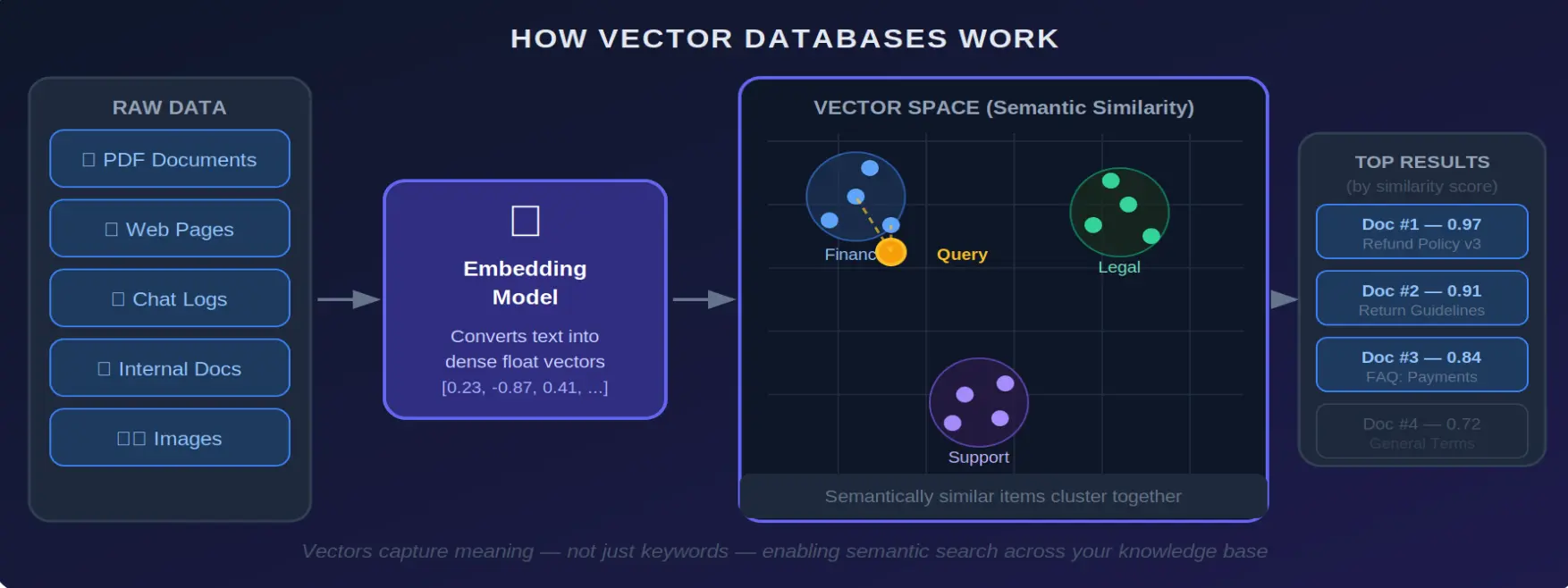
When you feed a document into a RAG system, it gets broken into chunks and passed through an embedding model — a neural network that converts text into a dense list of numbers called a vector. This vector is a mathematical representation of the text's meaning, not just its words.
Two sentences that say the same thing in different words will produce similar vectors. Two sentences that use the same word in different contexts will produce very different ones.
Why This Matters
Traditional search looks for keywords. A query for "return policy" would miss a document titled "Refund Guidelines." A vector database searches by meaning, so both match — along with "money-back terms," "cancellation conditions," and anything else semantically similar.
- Vectors capture semantic meaning — not just surface-level keywords
- Similar content clusters together in high-dimensional space, making retrieval lightning fast
- The retriever returns results ranked by similarity score, giving the LLM only the most relevant context
- Popular vector databases include Pinecone, Weaviate, ChromaDB, Qdrant, and pgvector
🚀 Operational Advantage of RAG You can change your LLM model without rebuilding your knowledge base. You can add new documents without retraining. This makes RAG systems dramatically cheaper and faster to maintain than fine-tuned models.
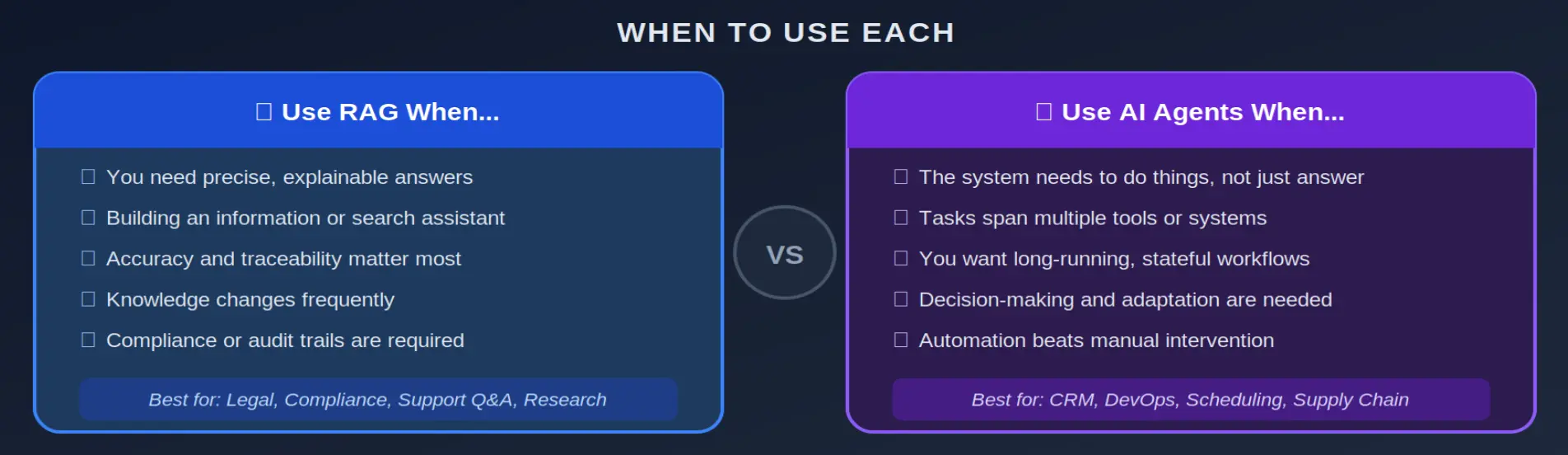
RAG is especially powerful in contexts where accuracy and trustworthiness are non-negotiable: legal, compliance, finance, customer support, and enterprise knowledge management.
What Are AI Agents?
If RAG gives the AI memory and facts, AI agents give it action and autonomy. Where a RAG system answers a question and stops, an agent can make decisions, call external tools and APIs, execute multi-step workflows, and adapt its behaviour based on results. Agents are, in the most practical sense, autonomous digital workers operating inside your software systems.
An agent doesn't just tell you what the answer is. It goes and does things on your behalf.
How an Agent Thinks and Acts
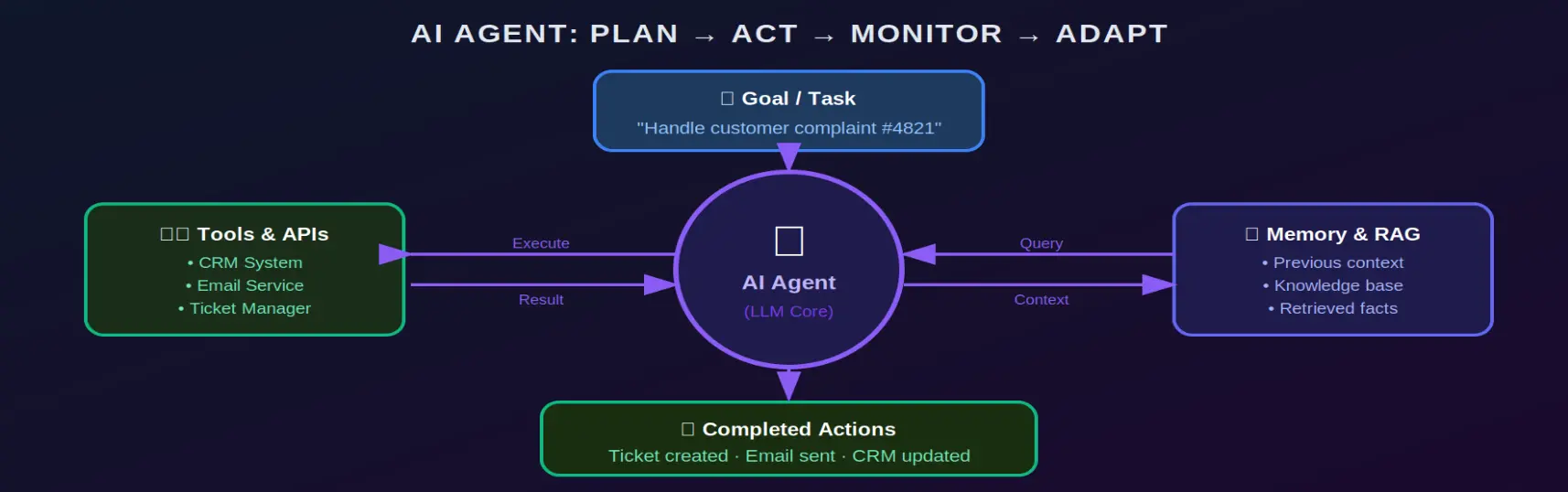
The agent loop is what sets agents apart from every other AI system. Given a goal, an agent will:
- Plan: Plan the steps required to reach the goal.
- Execute: Execute those steps by calling tools, APIs, or other systems.
- Monitor: Monitor results to see if things went as expected.
- Adapt: Adapt if something goes wrong — retrying, rerouting, or escalating.
What Agents Can Do
Agent capabilities are essentially bounded only by what tools you connect them to:
- Handle customer support workflows end-to-end — from query to resolution
- Triage support tickets, categorise urgency, and escalate to humans when needed
- Orchestrate multi-tool tasks: check inventory, send emails, update CRM records all in one run
- Monitor infrastructure, detect anomalies, and trigger automated recovery actions
- Schedule meetings, parse calendars, and draft follow-up communications
- Run data analysis pipelines and push insights directly into dashboards
⚡ What Makes Agents Powerful Agents are essentially automated workflow engines powered by AI reasoning. The intelligence lies not just in generating text, but in deciding what to do next and actually doing it.
Use Cases: RAG vs AI Agents
RAG Use Cases
RAG shines in knowledge-centric tasks where information accuracy is the primary requirement:
- Customer support assistants that pull from internal manuals and product documentation
- Compliance systems that answer policy questions and cite the exact clause
- Research assistants that summarise scientific papers and technical reports
- Enterprise search tools that surface answers from decades of internal knowledge
- Legal support chatbots that retrieve and explain contract clauses
Example: A legal support chatbot that retrieves the latest regulatory documents and cites the exact clause instead of paraphrasing from memory — giving lawyers answers they can stand behind.
AI Agent Use Cases
Agents are built for action, automation, and multi-step workflows that span multiple tools or systems:
- Automated task execution: emailing, CRM updates, calendar management
- Supply chain diagnosis and order re-routing based on live inventory data
- DevOps agents that detect failed deployments and trigger rollback procedures
- HR onboarding agents that provision accounts, send welcome emails, and schedule orientation
- Sales agents that qualify leads, draft proposals, and update pipeline records
Example: An agent that detects a critical server outage, restarts services via API, notifies the on-call team in Slack, and creates a support ticket — all in under 60 seconds, with no human in the loop.
RAG vs AI Agents — Side by Side
| Feature | 🔍 RAG | ⚡ AI Agents |
|---|---|---|
| Purpose | Provide accurate, grounded answers | Automate tasks and decision workflows |
| Knowledge Access | External documents at runtime | May use RAG as one of many inputs |
| Action | Generates text responses | Executes real actions via tools/APIs |
| Complexity | Moderate — easier to set up and audit | High — requires orchestration & error handling |
| Best For | Search, knowledge Q&A, documentation | Task automation, workflow handling |
| Transparency | High — can cite sources directly | Depends on design and logging layers |
When to Combine Them: Agentic RAG
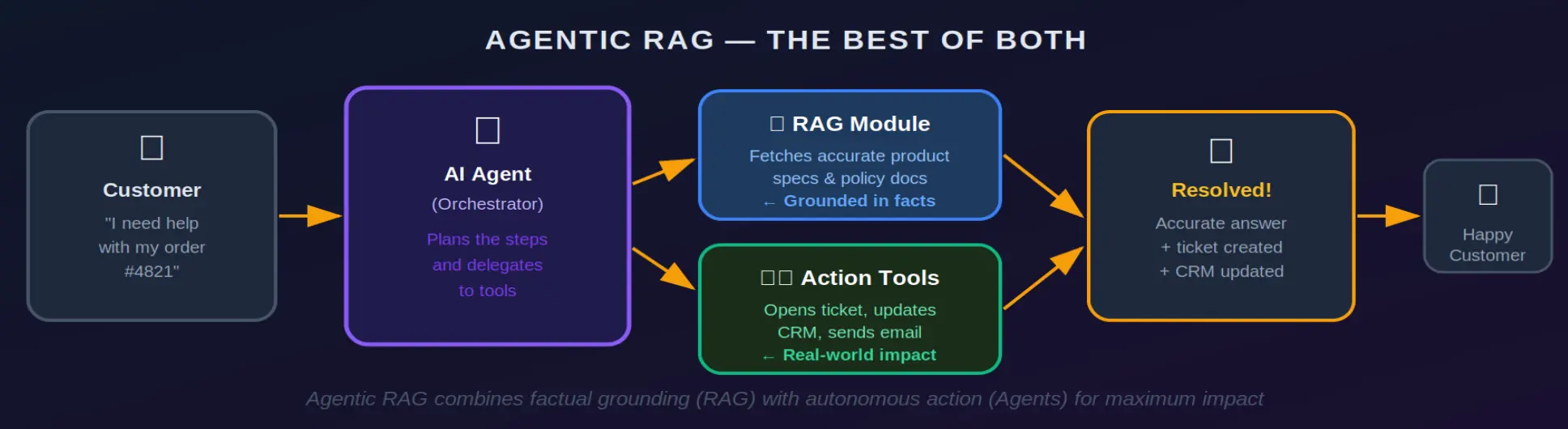
Here's where things get genuinely exciting. The most capable AI systems today don't choose between RAG and agents — they use both. Agentic RAG gives an agent the ability to actively query a knowledge base mid-workflow, grounding its decisions in verified facts while still taking real-world action.
Real World Example: Customer Support Assistant
Imagine a business that wants an AI system to handle customer enquiries end-to-end: answer questions, pull product specs, open tickets, and update CRM records. Let's see how each approach performs:
- RAG alone: Great at answering questions from your knowledge base. But it stops at the answer. It can't open a ticket or update your CRM.
- Agents alone: Can absolutely open tickets and update records. But without grounding, it might hallucinate product details or misquote policy terms.
- Agentic RAG: The agent uses RAG to fetch accurate product specs and policies, then takes action — opening the ticket, logging the interaction, and sending a confirmation email. Every decision is grounded; every action is real.
🏆 The Best of Both Worlds Agentic RAG is increasingly the default for production AI systems that need to be both trustworthy and useful. The combination eliminates the core weaknesses of each approach independently.
Wrapping Up
RAG and AI Agents aren't competitors. They solve different problems, operate at different layers of a system, and are most powerful when designed to complement each other.
- RAG: RAG gives your AI context and accuracy by grounding every response in verified, up-to-date knowledge.
- AI Agents: AI Agents give your AI agency—the ability to plan, act, and complete complex tasks across multiple tools and systems.
- Agentic RAG: Agentic RAG combines both, delivering systems that are simultaneously intelligent, honest, and genuinely useful.
When you choose the right pattern or combine them wisely, you stop building demos and start building products. That's the real goal.